 |
FourKit 29eeeb8
The LCE C# Server Plugin API
|
|
FourKit 29eeeb8
The LCE C# Server Plugin API
|
You can use any IDE of choice. I recommend using Visual Studio for new developers.
Also make sure you have .NET 10 SDK installed.
This tutorial will go over creating a plugin in Visual Studio.
When installing Visual Studio, make sure you have .NET SDK installed under Individual Components in the Visual Studio Installer.
After installing all the prerequisities, go to create a new Project and select Class Library for C#

After selecting class library and pressing OK, it should prompt what .NET version to use. Be sure to select .NET 10
You can name the project whatever you want.
After all thats done, you should enter the code environment.
First thing you should do is right click your project and add a reference to the compiled FourKit DLL.
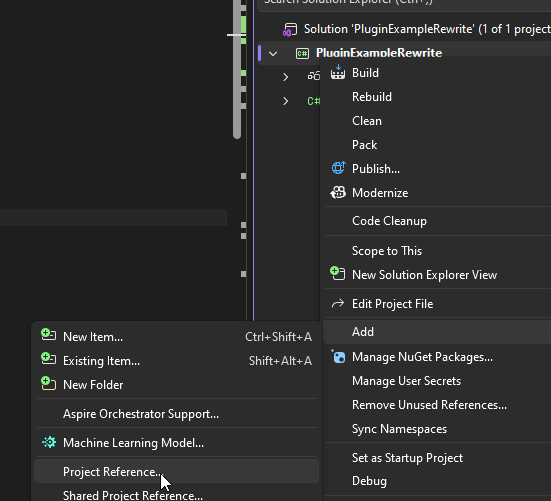
Afterwards a popup should appear. Click Browse and then browse to the DLL and then click OK.
After that you can continue to making a plugin!
If you dont want to install Visual Studio, you can use the dotnet CLI program.
You can create a new dll project by running dotnet new classlib -n MyAwesomePlugin
Be sure to add a reference to the FourKit DLL in your csproj file (example for it being in parent dir):
After this, you can build using dotnet build! Your compiled DLL should be in the bin folder.
To build as release: dotnet build -c Release
Make sure the target framework is set to net10.0!
Example full csproj file:
When you build your plugin, it will compile as a DLL.
You place this DLL into the plugins folder in your server directory.
You can also even have plugins with dependencies!
Below page will discuss actually making your plugin function, and using dependencies:
 1.16.1